



Step 1: Translate the Taobao Web Page into English
Since the marketplace is primarily meant for consumers in Mainland China, the entire Taobao website is in Chinese. As a foreign buyer, you first need to translate the page into English. To translate Taobao webpages, you need to:
1. Download and Install Google Chrome
If you do not have the Google Chrome browser installed on your computer, download and install it. Once installed, open the Chrome browser and open the Taobao homepage.
2. Translate Taobao
With the Tao so homepage displayed in Chinese, click on the Google Translate icon—appears on the top-right corner of the browser. This operation automatically translates the current page into the default language on your browser.
You can change this into any language you prefer from the settings menu, as illustrated below.
3. Modify Google Translate Settings
To alter the default translation language on your browser, launch the Chrome browser on your PC. Next, click “More”—towards the top right corner. You should then navigate to Settings > Advanced > Languages > Language.
Choose your preferred language from the drop-down menu then save the changes.
Step 2: Search for the Desired Product(s) on Taobao
Assuming that you already have an account on the platform, you first need to log into your Taobao account. Next, run a search for the product you wish to buy or related keywords. To do this, translate your keyword(s) into Chinese .
Next, enter the Chinese keyword into the search bar on Taobao then click “Search”. This should display numerous products that are related to your search. You could then apply Taobao search filters to narrow the search down to relevant items.
Now click on any product that appears to meet your requirements.
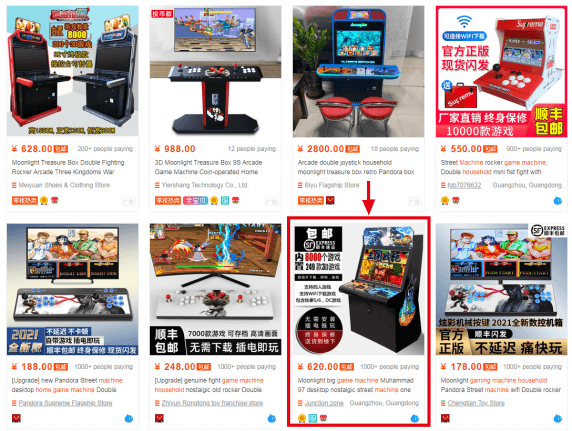
This will redirect you to the product page, as illustrated below:
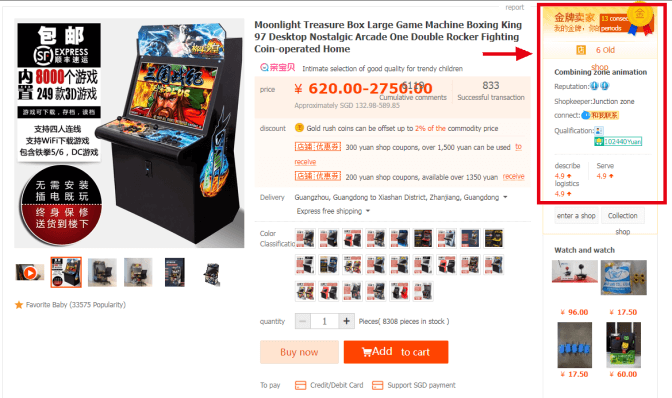
All the information you need to ascertain the credibility of a Taobao is found on this page. So, how can you use the Taobao merchant rating system to choose a reliable seller?
Step 3: Check the Seller’s Overall Reputation
As compared to other eCommerce platforms, Taobao offers one of the most comprehensive merchant feedback and reviews systems. Following each successful transaction, Taobao offers the buyers an opportunity to rate the seller and review them accordingly.
Customer reviews are then converted into points as follows:
· Positive review = 1 point
· Neutral review = 0 points
· Negative review = -1 points
Over time, the system combines these points with several other metrics to rate sellers. The rated points are then assigned the appropriate symbol, as illustrated in the following chart:
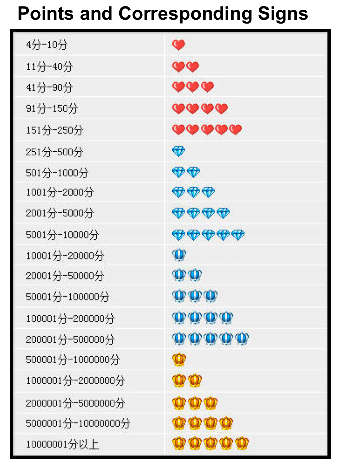
As per the chart, the highest rating a seller can attain on Taobao is yellow crowns. The lowest rank, in this case, is the heart. These are the symbols you will see under the “Reputation” section of the product page, as shown below.
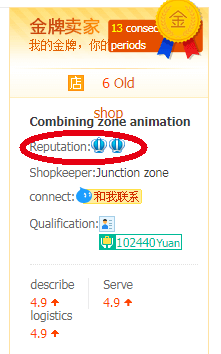
For instance, the seller depicted in the above image is rated two blue crowns. This means that the seller has accumulated between 20,000 and 50,000 points. A large number of points implies that the seller has served many satisfied customers in the past.
Step 4: Check the “Description”, “Service”, and “Logistics” Scores
In addition to points-based rating system, Taobao also offers a Comments section. Buyers on the platform may use this section to express their satisfaction or disappointment with a seller. The system allows verified buyers to rate 3 main seller metrics on a scale of 1 to 5.
In this regard, each buyer rates the seller in terms of:
· Service – the level of services offered by the seller during and after the transaction.
· Description – on a scale of 1-5, how well did the delivered product(s) match seller's description on Taobao listing?
· Logistics – the overall speed and quality of shipping offered by the Taobao seller for that particular item.
For each of these metrics, the buyer awards the seller a rating between 1(the worst) and 5(best). The average score for each of the metrics is displayed on the product page as shown below.
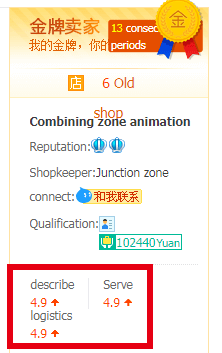
The red up/down arrows alongside each score is to show you whether the seller’s score is above or below the average market score. Just to be safe, you should go for sellers with a score of at least 4.5 for each of the three metrics.
Step 5: Check When The Store Was Opened
You can also check how long the seller has been operating an online store on Taobao. You may find this information on the product page, as illustrated below:
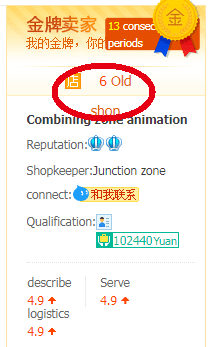
For instance, the store depicted in this image has been operational for six years. It is often safer to buy from stores that have been operational for a longer period. Again, a seller who has been business for quite a while should also have a large number of transactions to match.
However, this is not to mean that all the newer stores are bad. Some of the newer sellers on Taobao have proven to be just as reliable. For example, a newer Taobao seller may only have a two-heart reputation.
If most or all of the sales by such a seller have been rated positively, then the seller may be worth of your consideration.
Conclusion
Taobao is one of the best online marketplaces in the world, offering the perfect blend of convenience, variety, affordability, and quality. However, the same cannot be said for every single seller on the platform.
To avoid unnecessary inconveniences, you should only buy from the reputable and “proven” sellers on Taobao. You can use the merchant rating system on this platform to tell such sellers apart. The above discussed steps will help you understand the rating system and choose a reliable seller on Taobao.
Better still, you could hire an experienced Taobao agent to avoid costly inconveniences and delays.